What is Layerwise (Re)loading?
Layerwise reloading is the system used to handle the loading of new weight data into existing weight data destinations without triggering recompilation of the cuda graph and other runtime artifacts. This system is used to enable QeRL-style post training flows, where full-precision trainer weights are quantized and loaded into a target vLLM instance for fast, high-exploration rollouts. The core implementation can be found in layerwise.py.
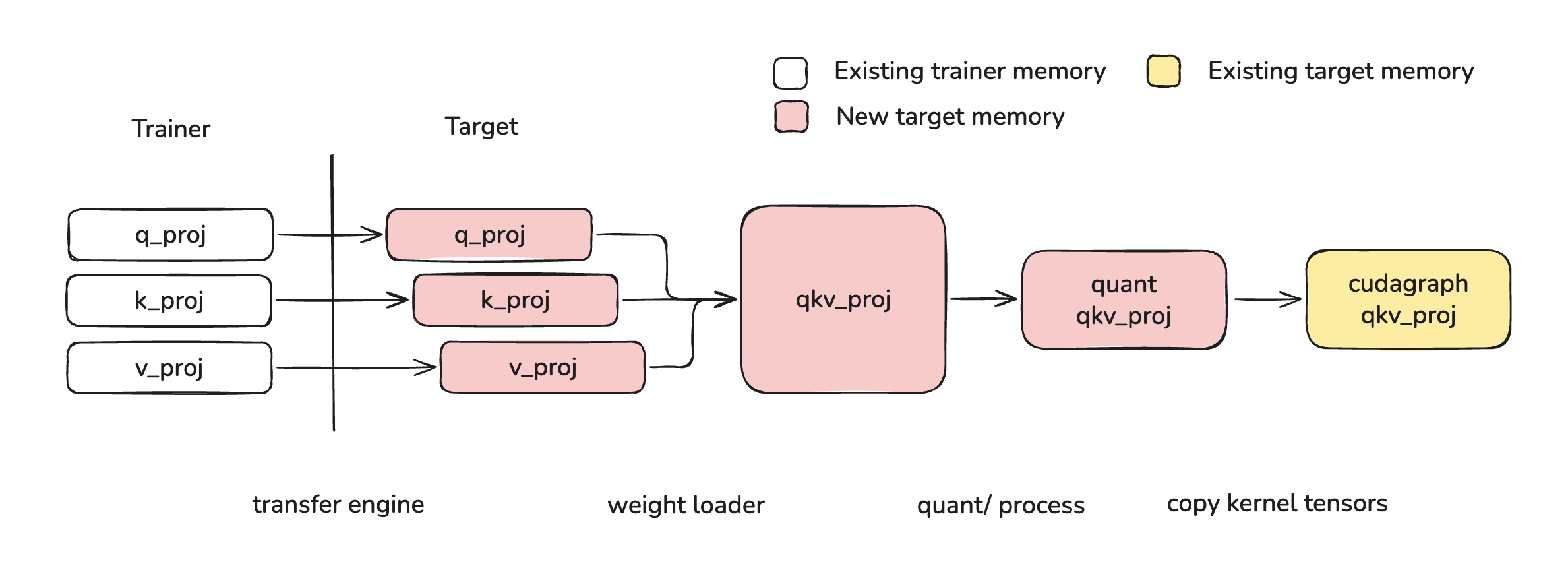
Layerwise Reloading for QeRL
In order to load new weights into existing weight data destinations, a weight must undergo the following operations:
- Transfer: weights must be transferred from trainer model to target node/device
- Fuse: weight partitions must be fused, for example qkv/gate_up
- Process: this typically means online quantization and kernel-specific padding or striding
- Shard: weights must be sharded according to the selected parallelism strategy
- Copy: weights must be copied into the existing weight data destinations
Layerwise reloading achieves this using the following steps:
- Weights are transferred from the trainer to the target (see weight_transfer)
- Weights loaded via
model.load_weights, during which they are sharded and fused - Weights are processed in an online fashion as soon as all of a layer's weights are loaded
- Weights are copied into the existing weight data destinations
For more information on implementation, see Low Level layerwise API.
Layerwise Loading with Online Quantization
Online quantization refers to when a user provides full precision weights and those weights are quantized on-the-fly as they are loaded into the model. The layerwise reloading system handles this by treating online quantization as a processing step, which is then handled in an online way both during first-time load and during reload. A typical online quantization method implementation should look like this:
class Fp8OnlineLinearMethod(Fp8LinearMethod):
    """Online version of Fp8LinearMethod which loads a full precision checkpoint
    and quantizes weights during loading."""

    uses_meta_device: bool = True

    def create_weights(self, layer: torch.nn.Module, ...):
        # weight is materialized and processed during loading
        layer.weight = ModelWeightParameter(
            data=torch.empty(..., device="meta"),
            weight_loader=weight_loader,
        )

        # set up online processing
        initialize_online_processing(layer)

    def process_weights_after_loading(self, layer: Module) -> None:
        if getattr(layer, "_already_called_process_weights_after_loading", False):
            return

        layer.weight, layer.weight_scale = ops.scaled_fp8_quant(layer.weight)

        # Prevent duplicate processing (e.g., during weight reload)
        layer._already_called_process_weights_after_loading = True
Example Usages
High Level Weight Transfer API
The layerwise reloading system is integrated with the post-training weight transfer system. To use layerwise reloading in conjunction to the weight transfer system, follow the examples found here. Layerwise reloading is controlled by the WeightTransferUpdateInfo.is_checkpoint_format flag and is set to True by default.
Mid Level reload_weights API
Layerwise reloading is also exposed via the reload_weights API. This interface can be called using the following code:
This interface also allows specifying a weights_path which can be used to select a checkpoint path to load from:
from vllm import LLM

# fine tuned model checkpoints for testing
mul_path = "inference-optimization/Qwen3-0.6B-debug-multiply"
add_path = "inference-optimization/Qwen3-0.6B-debug-add"

llm = LLM("Qwen/Qwen3-0.6B")
llm.collective_rpc("reload_weights", kwargs={"weights_path": mul_path})
llm.generate("3 4 = ")  # 12

llm.collective_rpc("reload_weights", kwargs={"weights_path": add_path})
llm.generate("3 4 = ")  # 7
Finally, a weights_iterator can be provided directly. This iterator can be lazy or eagerly defined.
from vllm import LLM

weights_iterator = [("q_proj", ...), ("k_proj", ...), ...]

llm = LLM("Qwen/Qwen3-0.6B")
llm.collective_rpc("reload_weights", kwargs={"weights_iterator": weights_iterator})
Low Level layerwise API
layerwise.py Implements the following functions to execute its lifecycle:
| Function | Purpose | Quantized Reload | Online Quantization |
|---|---|---|---|
record_metadata_for_reloading | Record tensor metadata so that layers can be restored on the meta device | Called by BaseModelLoader | Called by BaseModelLoader |
restore_layer_on_meta | Restore layer to model format at start of reload | Called by initialize_layerwise_reload | Not called. Online quantized weights already start on meta device via ...OnlineLinearMethod.create_weights |
initialize_online_processing | Wrap weight loaders with the online_process_loader wrapper, which buffers weights until all layer weights have been loaded | Called by initialize_layerwise_reload | Called by ...OnlineLinearMethod.create_weights |
_layerwise_process | Process layer once all weights are loaded | Called by online_process_loader during loading | Called by online_process_loader during loading |
_copy_and_restore_kernel_tensors | Copy processed weights into original tensor locations to affect compiled cuda graphs, etc. | Called by _layerwise_process after process_weights_after_loading | Not called. There is no compiled cuda graph yet |
finalize_layerwise_processing | Catch any layers which did not load all weights (for example attention weights or weights with padding) | Called by BaseModelLoader | Called by BaseModelLoader |
You can plug into this lifecycle directly by calling the initialize_layerwise_reload, loading weights, then calling finalize_layerwise_processing:
from vllm import LLM
from vllm.model_executor.model_loader.reload import initialize_layerwise_reload, finalize_layerwise_processing

llm = LLM("Qwen/Qwen3-0.6B")

# this model path requires `VLLM_ENABLE_V1_MULTIPROCESSING=0` and is not stable
model = llm.llm_engine.engine_core.engine_core.model_executor.driver_worker.worker.get_model()

# layerwise reload
initialize_layerwise_reload(model)
model.load_weights(...)
finalize_layerwise_processing(model, llm.model_config)
Troubleshooting Excessive Memory Usage
Layerwise reloading allows users to incrementally load and process weights as they are loaded into the model. This system relies on buffering layer weights on device until all weights of a layer have been loaded. However, without offloading, this approach necessarily causes excessive buffering if weights are loaded out of order.
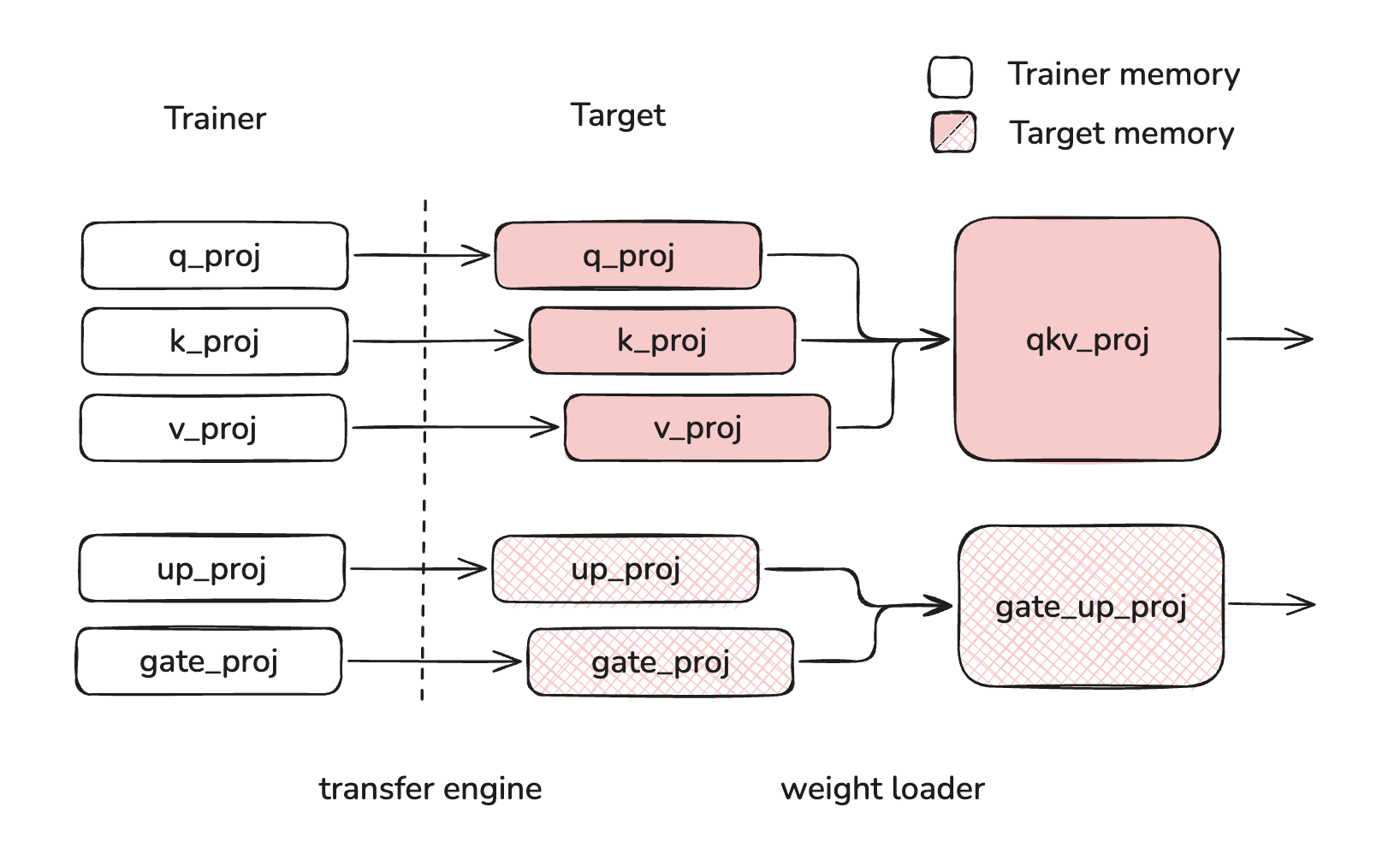
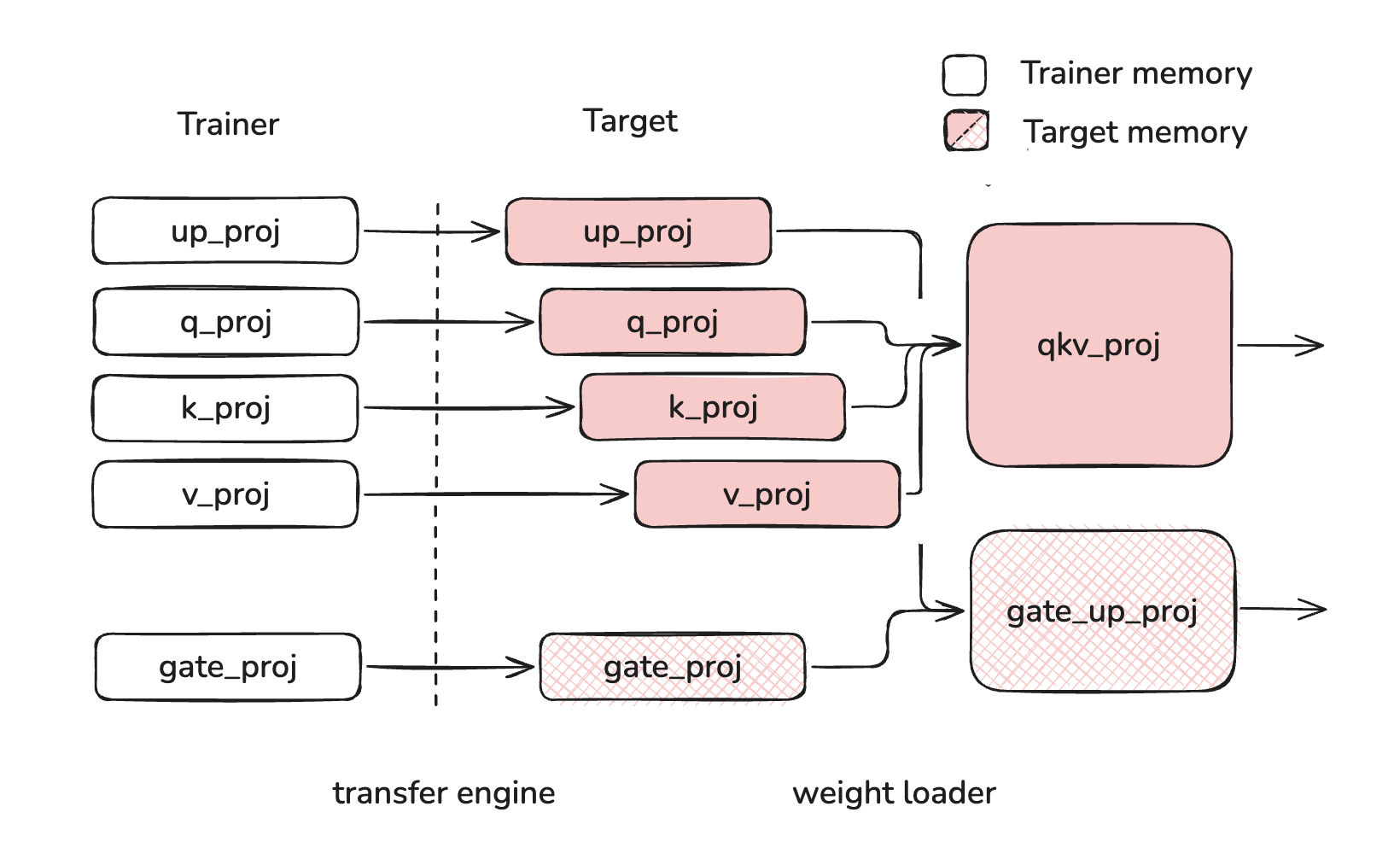
For this reason, users must take care as to the order of weights when they are reloading into the model. Weight should be loaded "in order", meaning that each layer's weights are fully loaded before beginning to load the next layer's weights. "Out of order" loading can cause layer weights to stay buffered while other layer weights are loading, leading to excessive memory usage. In the example below, q_proj, k_proj, v_proj, and up_proj are all buffered at the same time, using more memory than if up_proj was loaded after q_proj, k_proj and v_proj.
| Correct Loading | Incorrect Loading |
|---|---|
 |  |
Users will see a warning like the one below if weights are loaded out-of-order.